Start here — one prompt is all you need
If you use Claude Code or Kimi Code, this section is all a human needs. Everything below — prerequisites, installation, commands — is written for the AI to read, not you. Just point your AI at this manual and go.
To install or use vibe-ic, you don't need to know Docker, the MCP, phases, or any command. In the TUI / CLI of Claude Code, Kimi Code, or Codex, just tell the AI what you want in one plain sentence and it handles everything underneath. Copy-paste any of these.
1 · Install it — the AI reads the manual and sets everything up
Read https://vibeic.ai/manual.html, and install vibe-ic plugin and vibeic-eda MCPWhen it reports done, quit Claude Code and start it again. MCP servers are registered only at start-up, so until you restart, the vibeic-eda tools do not exist in the session that just installed them — the AI will tell you the install succeeded and then be unable to call a single EDA tool.
2 · Upgrade — move the plugin + EDA image to the latest
Read https://vibeic.ai/manual.html, and upgrade vibe-ic plugin and vibeic-eda MCP to the latest versionTwo layers move together, in this order: the AI updates the plugin (skills, agents, programs, the eda-tools MCP), then re-runs the upgraded plugin's own PULL=1 bash "$PLUGIN/tools/vibeic-eda/restart-eda.sh" (Installation, step 2), which pulls the newest published image and recreates the vibeic-eda container on it. Then quit Claude Code and start it again so the MCP re-registers against the fresh container. Key gotcha: a running container is fixed to the image it was created from, so a bare docker pull does NOT upgrade a live MCP — and the container has to be recreated. The plugin does not pin a version: it resolves the identity of whatever vibeic-eda image this host actually holds, so the image and the plugin release independently. What still matters is the container's image is checked by digest, so a container left on an OLDER image is refused. The script carries the old container's mounts, user, workdir and command across; the memory ceiling comes from VIBEIC_DOCKER_MEMORY, so export the value you use before re-running it.
3 · Run an open benchmark evaluation
run vibe-ic benchmark VE-v2 and VE-HumanAlso works for RTLLM or CVDP.
4 · Reproduce a benchmark IC or IP cell
IC path
run vibe-ic plugin with vibeic-eda MCP for benchmark IC spm by using sky130A PDKIP cell path
run vibe-ic plugin with vibeic-eda MCP for benchmark IP spm by using sky130A PDKSwap spm for any of the eight benchmark designs: spm, sha256, subservient, u_hawaii_adc, opentitan_aes, ibex, caravel_user_project, edge_llm_accel. Choose the IC path for a complete chip, or the IP cell path for reusable IP.
| IC | Function | GDSII | Sign-off DRC |
|---|---|---|---|
| spm | 32-bit shift-and-add serial/parallel multiplier | ✅ 984 KB · 130×130 µm | ✅ 0 |
| sha256 | SHA-256/224 hash accelerator | ✅ 23.8 MB · 532×532 µm | ✅ 0 |
| subservient | Bit-serial RV32I SoC (SERV core) | ✅ 2.1 MB · 153×153 µm | ❌ 3 (m3.1 ×2, m3.6) |
| u_hawaii_adc | Incremental ΔΣ ADC + on-chip LDO (all-analog top) | — none produced (no automated analog layout) | — not run |
| opentitan_aes | AES-128/192/256 crypto unit (TL-UL peripheral) | ✅ 84.0 MB · 947×947 µm | ✅ 0 |
| ibex | lowRISC Ibex RV32IMC CPU core | ✅ 39.9 MB · 645×645 µm | ◐ 0 items, but BEOL rules only (no FEOL) |
| caravel_user_project | Caravel user-project wrapper harness | ✅ 91.2 MB · 2920×3520 µm | ◐ 0 items, not independently corroborated |
| edge_llm_accel | 64×64 INT4 systolic GEMM edge-LLM accelerator | ◐ 2.2 GB streamed · handoff copy 0 B | ❌ 23,083 (FreePDK45 educational deck) |
Snapshot of the clean-run campaign plugin v1.4.62 · sky130A · 2026-07-20 (historical — the plugin is v1.25.0 as of 2026-09-26; these numbers have not been re-measured at that version) (edge_llm_accel is a separate nangate45 run). ✅ passed · ◐ partial · ❌ not passed · — not applicable or not run. Six of six digital ICs stream a real, openable GDSII. LVS and STA are deliberately not shown here: neither gate is closed yet across the set — LVS still stops at a gate-level topology compare, and setup misses at the slow sign-off corner — so publishing a column of them would read as a result rather than as work in progress. Both are systematic, chip-agnostic tool-layer gaps, not design or connectivity defects, and both are on the fix list. The full per-gate trajectories, the residual triage and the reproduce commands are on the Evaluation page.
Open-source PDKs built into the vibeic-eda image
| PDK | Node | Source / licence | Tape-out capable | Notes |
|---|---|---|---|---|
| sky130A | 130 nm | SkyWater · open_pdks · Apache-2.0 | ✅ | Flow default. The only built-in PDK shipping both a KLayout DRC deck and a netgen LVS deck. |
| gf180mcuD | 180 nm | GlobalFoundries · open_pdks · Apache-2.0 | ✅ | KLayout DRC deck built in; LVS deck supplied per project. |
| ihp-sg13g2 | 130 nm SiGe BiCMOS | IHP Open PDK · Apache-2.0 | ✅ | The container's own default PDK; the analog / mixed-signal workhorse. |
| ihp-sg13cmos5l | 130 nm (M1–M4–TM1 stack) | IHP Open PDK · Apache-2.0 | Upstream marks it in development | Arrives with the iic-osic-tools base layer. Not registered in pdk_registry.json, so the digital Phase-3 flow does not accept it by name — resolvable on the analog path only. |
| nangate45 | 45 nm | NanGate / FreePDK45 · Apache-2.0 | ❌ research / education | Generic, non-foundry enablement for PPA exploration and flow regression. Image 0.2.22+. |
| asap7 | 7 nm FinFET (predictive) | ASU / ARM ASAP7 · BSD-3-Clause | ❌ research / education | Predictive advanced-node enablement (asap7sc7p5t, RVT/TT). DRC deck only, no LVS deck. Image 0.2.22+. |
| your own PDK | — | Project-local, read at run time | Depends on your PDK | Drop the Liberty / LEF / GDS views under the project and the flow auto-detects them. Commercial PDKs are never baked into the image. |
5 · Build your IC or IP cell — hand it a folder of design docs + a PDK
IC path
Here are my design documents in the folder ./my-design. Run the full vibe-ic IC flow on them with the sky130A PDK.IP cell path
Here are my design documents in the folder ./my-design. Run the full vibe-ic IP cell flow on them with the sky130A PDK.Choose the IC path for a complete chip, or the IP cell path for reusable IP. Point either path at your own input folder and PDK (sky130A / gf180mcuD / your commercial PDK). The AI runs Phase 1 → 2 → 3 on the selected route and reports the verdict — you never touch a command.
6 · Capture an improvement back into the tools
Capture this enhancement into the vibe-ic plugin and vibeic-eda MCP, then verify itWhen the AI hits a general, chip-agnostic gap or a fix worth keeping, it freezes the improvement into the plugin / MCP forks — the ratchet that only moves forward.
Field-tested setups include Claude Code with Claude Opus 4.8, Kimi K3 with thinking: max, and Codex with GPT-5.6-Sol at xhigh reasoning. Benchmark rows below bind every result to its exact authoring model and plugin version.
Getting started & usage guide
What Vibe-IC is, what you need, how to install it in one step, and how to run your first design end to end — plus every command and how to read the result.
What is Vibe-IC
Vibe-IC is an open-source Claude Code plugin plus an MCP server for EDA tools. It lets you design chips in natural language: from a plain-language prompt or a set of existing design documents, it drives one automated flow all the way to GDSII. The flow is program-first — deterministic programs do the work and hold every gate — with an AI expert as the backup that reviews, fills gaps, and repairs failures. It is chip-agnostic (no per-chip hard-coding) and the plugin is Apache-2.0 licensed.
When the plugin loads, Claude becomes the IC Expert Agent — it knows the plugin's capability scope, all entry paths, and the expected result of every phase. You never have to be an IC engineer to start.
Two ways in
Path A — talk to the IC Expert Agent in plain language. Path B — drop existing vendor design docs in a folder. Both converge to the same structured L-docs.
One unified backend
Every input becomes a document first, then flows through the same doc-extraction track — so the emitted L1–L27 JSON is homogeneous regardless of source.
Real open-source signoff
Backend runs on real, forked open-source EDA — yosys, OpenROAD, KLayout, ngspice, magic, netgen, iverilog, OpenSTA, SymbiYosys — inside an EDA container.
Prerequisites
Vibe-IC's EDA tools run inside a Docker container, and the plugin runs inside Claude Code. You need the following on your host machine before installing.
| Tool | Version | Check |
|---|---|---|
| Docker | 20.10+ | docker --version |
| Node.js | 18+ | node --version |
| Python | 3.10+ | python3 --version |
| Claude Code | latest | claude --version |
Also recommended: Linux (Ubuntu 22.04 or 24.04) and about 30 GB of free disk — the forked EDA Docker image is roughly 26 GB. A PDK is needed for physical design; SKY130 is the default, with GF180MCU, IHP-SG13G2, NanGate45 and ASAP7 plus custom PDKs supported. FPGA and lab hardware are optional.
PDK (for Phase 3)
SKY130 (130nm) default; GF180MCU (180nm) and IHP-SG13G2 (130nm) plus custom PDKs supported. Also built in: NanGate45 (generic 45nm) and ASAP7 (7nm FinFET, predictive, BSD-licensed) — research / education PDKs, not tapeout-capable. Auto-detected from the project, or pass it explicitly.
FPGA (optional)
Intel Quartus Prime Lite (free) plus a Cyclone- / MAX10-family board for on-board bring-up. Tested on Terasic DE10-Lite.
Lab hardware (optional)
A USB scope (tested on Keysight DSO-X 3014T) or any HID-class USB device. Drop a manifest.json in the MCP devices folder and it registers as an MCP tool.
Installation
Three steps: install the plugin (which bundles and auto-wires the MCP-EDA server), start the EDA container with the plugin's own script, then confirm the wiring is green. No manual MCP configuration is required, and you never type an image name: the installed plugin names the exact image it was verified against.
Watch — full install walkthrough
A start-to-finish screen recording of the install below, following this manual step by step. 中文 on YouTube, English on Vimeo.
-
Install the vibe-ic plugin (one step)Add this repo as a Claude Code marketplace and install the plugin. This also bundles and auto-registers the MCP-EDA server — no separate claude mcp add is needed. Its npm dependencies install on first run.
claude plugin marketplace add vibeic/vibe-ic
claude plugin install vibe-ic
Inside an interactive Claude Code session, the same two commands are:/plugin marketplace add vibeic/vibe-ic /plugin install vibe-ic@vibe-ic-marketplace -
Start the EDA container — with the plugin's own scriptThe plugin's EDA tools run inside the vibeic-eda container, and the plugin checks that container's image BY DIGEST — but the required digest is RESOLVED, never stored: the plugin reads whatever vibeic-eda image this host holds, newest first by the image's own version label. A container left on an OLDER image, or on the upstream base, is refused as CONTAINER_IMAGE_MISMATCH. The installed plugin ships tools/vibeic-eda/restart-eda.sh, which pulls the newest published image (PULL=1) and creates the container named vibeic-eda on it. Upgrading is the same command run from the upgraded plugin: it recreates the container on the new pin and carries its mounts, user, workdir and command across. The identity bind-mount is required so Phase 3 paths resolve inside and outside the container.
# point VIBEIC_DESIGNS at YOUR designs/project folder — it must already exist export VIBEIC_DESIGNS="/path/to/your/designs" # your project / designs folder [ -d "$VIBEIC_DESIGNS" ] || { echo "VIBEIC_DESIGNS must be an existing directory"; exit 1; } # the installed plugin (step 1) — it, not this page, names the image PLUGIN="$(python3 -c 'import json, os; d = json.load(open(os.path.expanduser("~/.claude/plugins/installed_plugins.json"))); print(d["plugins"]["vibe-ic@vibe-ic-marketplace"][0]["installPath"])')" # memory: the script sizes the container's ceiling itself (the plugin's # _docker_memory.py rule — 70% of host RAM; a single yosys has been measured at # 54–109 GB, so a small fixed cap would OOM-kill real synthesis/PnR). Only set # VIBEIC_DOCKER_MEMORY=<size> to cap it DELIBERATELY, or =0 to opt out. # projects: every project tree you will run must live UNDER $VIBEIC_DESIGNS — # it is mounted at its own path and at /foss/designs, and the plugin resolves a # project's container path by asking which mount contains it; a path outside # every mount is refused (DESIGNS_ROOT_UNRESOLVED), never guessed. # pull the newest published image and create the container named vibeic-eda # on it. Re-running it is the upgrade. The plugin stores no version of its own. PULL=1 bash "$PLUGIN/tools/vibeic-eda/restart-eda.sh" docker exec vibeic-eda yosys --version # sanity check — prints a version -
MCP auto-wire & health checkThe plugin ships .mcp.json, which starts the eda-tools MCP server and points it at the vibeic-eda container (EDA_CONTAINER=vibeic-eda). Every eda_* tool then runs inside the container. Confirm it is green by asking the agent to run the health tool — expect 17/17 checks passed:
eda_doctor # or: mcp_server_health_check
Under the hood, the physical & verification steps run on an enhanced open-source EDA toolchain, vibeic-eda — 42 forks (OpenROAD, OpenSTA, yosys, magic, netgen, iverilog, klayout, ngspice, verilator, cocotb, cocotb-coverage, pyuvm, sby, ALIGN-public, ALIGN-pdk-sky130, gtkwave, slang, sv-elab, xschem, Xyce and yices2) with gated fixes and verified coverage against the commercial tools they replace. Part 3 of this manual covers exactly what was enhanced and how it compares.
Optional — verify the install reproduces our numbers
A clean-platform verification script checks host tools → plugin structure → plugin self-checks → benchmark reproduce, and prints VERDICT: READY. Datasets are external; omit an env var to skip that benchmark.
RTLLM_DATASET=/path/to/RTLLM \
VEV2_DATASET=/path/to/verilog-eval/dataset_spec-to-rtl \
VEHUMAN_DATASET=/path/to/verilog-eval/dataset_code-complete-iccad2023 \
tools/release/verify_clean_platform.sh # expect: VERDICT: READYQuick start — your first design, end to end
There are two input modes. Both feed the same Phase 1 → 2 → 3 flow.
Mode A — an input folder (deterministic runner)
Put existing design docs under the project's input/docs/ (or a free-text spec that the doc track render-bridges), then run the top-level one-shot runner. It auto-detects Path A vs B and chains Phase 1 → 2 → Analog → 3.
python3 vibe-ic-marketplace/plugins/vibe-ic/programs/vibe_ic_one_shot_runner.py <project> --pdk sky130A
# → <project>/reports/vibe_ic_one_shot.json  (phases[], halted_at, verdict)
Inside an interactive Claude Code session the same run is one slash command:
/vibe-ic-all <project-dir>Mode B — dialogue (natural language)
Open Claude with the plugin and describe your chip in plain language. Claude, as the IC Expert Agent, elicits the spec, fills gaps, and runs the flow.
claude "Design a temperature sensor IC: I2C interface, 12-bit,
        alert output, SOIC-8 package."
Where inputs go, where outputs land
Inputs
Existing docs, or a free-text prompt, or dialogue — all become the same document track:
input/docs/ · phase1/input_prompt/Phase 1 output — the spec
Machine-readable L-docs plus a human-readable copy:
phase1/generated_docs/L*.jsonphase1/human_docs/L*.md
Phase 2 → 3 output — silicon
RTL, then the synthesized netlist, then the final GDSII:
phase2/stage1/rtl/*.svphase3/stage4/gds/*.gds
After any run, read the JSON report the runner writes (reports/*_one_shot.json). Check phases[], halted_at, and the overall verdict — then jump to the matching /vibe-ic-phase<X> rules for the phase that halted.
Bring your own PDK, IP, device & FPGA
Vibe-IC follows the industry separation of tools from data: the vibeic-eda container ships the EDA tools, and everything foundry- or user-specific is supplied at run time, scoped to your project — never rebuilt into the image. Real PDKs and commercial IP are usually under NDA or licence and legally cannot be redistributed inside a shared image, so this is a hard rule, not a preference.
The one exception is genuinely open, redistributable, generic reference enablements, which are built in as batteries-included — SkyWater sky130A, GlobalFoundries gf180mcuD, IHP SG13G2, plus the research / education PDKs NanGate45 and ASAP7 (predictive, not tapeout-capable). Anything else you register stays in your project.
PDK — a built-in one, or your own
Pick a built-in reference PDK by name — sky130A, gf180mcuD, IHP SG13G2, plus the research / education PDKs NanGate45 (generic 45nm) and ASAP7 (7nm FinFET, predictive, BSD-licensed; not tapeout-capable) — or drop your own PDK views into the project and let the flow detect them. No image change either way.
# A built-in open reference PDK (batteries-included):
python3 .../programs/phase3_one_shot_runner.py <project> --pdk sky130A   # or gf180mcuD / nangate45 / asap7

# Your own PDK — drop the views under the project, then --pdk auto:
<project>/input/pdk/liberty/*.lib
<project>/input/pdk/lef/*.lef
<project>/input/pdk/gds/*.gds
python3 .../programs/phase3_one_shot_runner.py <project> --pdk auto   # site / metal / clk auto-detected
Through the MCP tools (eda_synth / eda_pnr / eda_gds / eda_sta) the same custom PDK is passed by path with pdk:"custom":
eda_pnr  pdk:"custom"  custom_lib:"…/my.lib"  custom_techlef:"…/my.tlef"
         custom_celllef:"…/my.lef"  custom_cellgds:"…/my.gds"
         custom_site:"CoreSite"  custom_metal_prefix:"Metal"
         custom_vdd:"VDD"  custom_vss:"VSS"
IC IP & hard macros
SRAM, OTP, ADC, PLL and other hard macros are project-local data. Place their views — LEF for PnR, Liberty for timing, GDS for streamout, Verilog for the gate view — under the project, and PnR integrates them across every backend step. Licensed vendor IP never enters the shared image.
pdk_local/<vendor>/ · *.lef · *.lib · *.gds · *.vDevices & FPGA boards
Physical instruments — oscilloscope, DE10-Lite / MAX10 FPGA, MD-905 — are not files. The container is given access to the host hardware at run time over USB / serial / network, and the device_* and eda_fpga_* tools drive them; nothing is baked in. An FPGA's board and part number are project data; the open synthesis toolchain is in the image, while a licensed vendor compiler (e.g. Quartus for the DE10-Lite) is an external / host install, not the shared image.
Does registering something change the image?
| What you register | Image rebuilt? | How it attaches |
|---|---|---|
| Your own PDK / IP / FPGA board files | No | Project-local files, read at run time |
| Open, generic reference (e.g. NanGate45) | Optional — the exception | Baked in as batteries-included |
| Vendor tool / commercial engine | No | Host install or sidecar container |
| Physical instrument / FPGA board | No | Run-time device passthrough |
Planned: a single per-project enablement.json manifest plus an attach interface, so you register any of the above once and refer to it by name — unifying today's input/pdk/, pdk:"custom", and pdk_local/ conventions. Until it ships, use the per-class conventions above.
Commands reference
Six slash commands drive the flow, plus one for running open benchmarks. Each is a thin front door to a deterministic runner program; the AI then monitors the JSON report and close-loops any failing step.
| Command | What it does | Runner program |
|---|---|---|
| /vibe-ic-all <project> | The whole flow: Phase 1 → 2 → Analog → 3. Auto-detects Path A (NL prompt) vs Path B (vendor docs). Halts on Phase 1 or 2 FAIL; Analog FAIL is recorded but does not block Phase 3. | vibe_ic_one_shot_runner.py |
| /vibe-ic-phase1 <project> | Phase 1 only: natural-language / docs → L1–L27 JSON + human-readable MD. Phase 1 not PASS means you cannot enter Phase 2. | phase1_one_shot_runner.py |
| /vibe-ic-phase2 <project> | Phase 2 only: L-docs → RTL → synth → FPGA .sof → on-board verify, with an auto-retrying RTL-regeneration loop (named eco_loop in the code; it re-generates RTL, so it is not an ECO). Requires generated_docs/L1..L13.json to exist. | design_one_shot_runner.py |
| /vibe-ic-phase3 <project> | Phase 3 only: synth → PnR → GDS → DRC → LVS → STA / IR / EM. PDK auto-detected from input/pdk/, or falls back to sky130A. DRC / LVS may be WAIVED (commercial deck runs offline). | phase3_one_shot_runner.py |
| /vibe-ic-phase23 <project> | A true chain of Phase 2 → Phase 3. If Phase 2 verdict is FAIL it auto-halts before Phase 3. Reports from both phases are aggregated into one JSON. | phase23_one_shot_runner.py |
| /vibe-ic-analog <project> | The standalone Analog A1–A9 track, then expert fallbacks, output review and the final analog compliance gates. | analog_one_shot_runner.py |
| /vibe-ic-benchmark <bench> | Run a known open IC benchmark (VerilogEval-v2 / Human, RTLLM, CVDP) the correct way — it routes to the right run-shape, sets up the run dir, and invokes the scorer. Use --list, --setup, or --score. | benchmark_dispatch.py |
Every command runs its program as python3 ${CLAUDE_PLUGIN_ROOT}/programs/<runner>.py, so you can also invoke the runner directly (as in Quick Start Mode A). If you call a command with no project path, it will ask for one — it never guesses.
Reading the gates
The flow is gate-enforced. Each stage ends with a compliance gate, and the whole flow has one sole acceptance criterion: a claim of complete is only valid when flow_compliance_check.py --strict returns Overall: PASS or PASS_WITH_WAIVERS. An individual gate passing is necessary but not sufficient.
Anti-fabrication — why you can trust a PASS
There is no silent PASS: every tool failure surfaces an actionable hint. Every tool call is logged to provenance.jsonl with its tool, version, input/output hash, exit code and duration, and canonical artifacts (L-docs, SOF, GDS, netlist, LEF, Liberty, each sign-off report) are attested by SHA256. That is what lets the gate distinguish a real result from a fabricated one.
Honest scope: a Phase-3 PASS means the design cleared every open-source sign-off gate on the layout (a tool/geometry result), NOT that it is silicon-proven. A production tapeout additionally needs a commercial-tool cross-check (Calibre / PrimeTime) and an actual silicon shuttle. See the Benchmarks section and the site Disclaimer.
Every one of those gates is defined in one file, phase1_phase2_phase3.yaml — 70 step entries, the exact command that verifies each one, and the 9 judgment dimensions the matrix above is built from. It is worth understanding on its own terms, including where it genuinely drives the flow and where it only declares intent.
Troubleshooting & FAQ
EDA tools fail / container not found
The MCP server expects a running container named exactly vibeic-eda (set by EDA_CONTAINER in the plugin's .mcp.json), on the newest vibeic-eda image this host holds. Create it with the plugin's own PULL=1 bash "$PLUGIN/tools/vibeic-eda/restart-eda.sh" (Installation, step 2) — a container you started by hand with docker run on another image is refused as CONTAINER_IMAGE_MISMATCH, and re-running that command replaces it. Then have the agent run eda_doctor or mcp_server_health_check to confirm the wiring is green (17/17).
A tool won't resolve on docker exec
The forked image bakes /foss/tools onto a global PATH, so a bare docker exec vibeic-eda yosys --version resolves without a login shell. If your container is on an older image, recreate it config-preserving with PULL=1 bash "$PLUGIN/tools/vibeic-eda/restart-eda.sh" — no version argument: the newest image on this host names itself.
PDK missing in Phase 3
Phase 3 auto-detects a PDK from input/pdk/{liberty,lef}/ and falls back to sky130A if none is present. To force one, pass --pdk sky130A (or gf180 / a custom PDK). If PnR fails on site name or metal prefix, the PDK was likely mis-detected — set it explicitly.
DRC / LVS came back WAIVED — is that OK?
For open PDKs the forked KLayout/magic/netgen run the deck natively, so DRC/LVS produce a real verdict. A WAIVED verdict is legal only when a commercial rule deck must be run offline for final sign-off — the layout must still be run through that deck before tapeout. If a deck should have been found and was not, fix the path.
Phase 2 will not start
Phase 2 strictly depends on the Phase 1 output: generated_docs/L1..L13.json must exist. If Phase 1 is not PASS you cannot enter Phase 2 — run /vibe-ic-phase1 first and get it to PASS.
Do I need to be an IC engineer?
No. In dialogue mode the IC Expert Agent talks to you in plain product language, elicits the spec, and fills the parameters you cannot state. You describe what the chip should do; the flow handles the silicon.
Design architecture & philosophy
How the 3-phase flow is structured, what each step actually does, and the three ideas that shape every design decision: open platform, program-first, and AI-backup.
The 3-phase flow at a glance
One automated flow spans 3 Phases and 5 Stages. The digital main line runs Phase 1 → 2 → 3; the Analog (A1–A9) and Mixed-signal (M1–M4) tracks run in parallel and interleave where their deliverables belong. Each stage ends with a compliance gate — nothing advances until its gate passes.
| Phase | What happens | Deliverable | Acceptance gate |
|---|---|---|---|
| 1 · Spec | Any input → DOC→JSON → L1–L27 structured design docs (L1–L13 core; L14–L27 advanced / opt-in). | phase1/generated_docs/L*.json phase1/human_docs/L*.md |
L1–L27 completeness PASS |
| 2 · Design | L-docs → RTL → verification → synthesis → DFT → FPGA .sof. Analog A2–A4 (topology → netlist → PVT corner sweep) interleaves here. | phase2/stage2/synth/post_dft_netlist.v | LEC PASS + FPGA on-board PASS |
| 3 · Silicon | Netlist → PnR → DRC / LVS / STA / IR / EM → GDSII → tapeout → manufacturing. Analog A5–A9 and Mixed-signal M1–M4 interleave here. | phase3/stage4/gds/*.gds | tapeout_checklist 4/4 + flow_compliance --strict: PASS |
This is the overview. For every step's exact input, output, and the EDA tool that runs it — all 3 Phases, 5 Stages, and the Analog / Mixed-signal tracks — open the Full Flow page.
Every step, in detail
Each phase decomposes into named stages, and each stage into concrete steps. A step is never a black box: it declares its input, its output, the exact EDA tool that runs it, and the gate that must pass before the next step starts. The Step Reference documents all of them — Phase 1 doc extraction (L1–L27), Phase 2 RTL / verify / synth / DFT / FPGA, Phase 3 PnR / DRC / LVS / STA / IR / EM / GDS, and the Analog A1–A9 and Mixed-signal M1–M4 tracks.
Phase 1 — Spec → L-docs
Doc / dialogue → the DOC→JSON track → L1–L27. The IC Expert Agent reviews every layer for completeness and fills what you cannot state.
Phase 2 — Design → netlist + SOF
RTL authoring, lint, CDC/RDC, simulation, formal, synthesis, DFT, and an FPGA prototype verified on-board — each behind its own gate.
Phase 3 — Silicon sign-off
Constraint setup, PnR, CTS, DRC, LVS, multi-corner STA, IR-drop, EM, antenna, GDS stream-out, and the tapeout checklist.
Vibe-IC Studio — the flow as a GUI
Prefer clicking to typing? Vibe-IC Studio is a web control surface over the same flow — it turns the "type a prompt to drive the plugin" workflow into a deterministic dashboard. The whole flow lives on one page: every canonical step's input/output folders, produced files and verification result, with per-step Run / Re-run in any phase, and a choice of which model (Claude / GPT / GLM / Kimi) authors the AI-backed steps — all on a subscription account, no API key. Everything shown is discovered from the authoritative plugin and the benchmark-data tree, never invented.
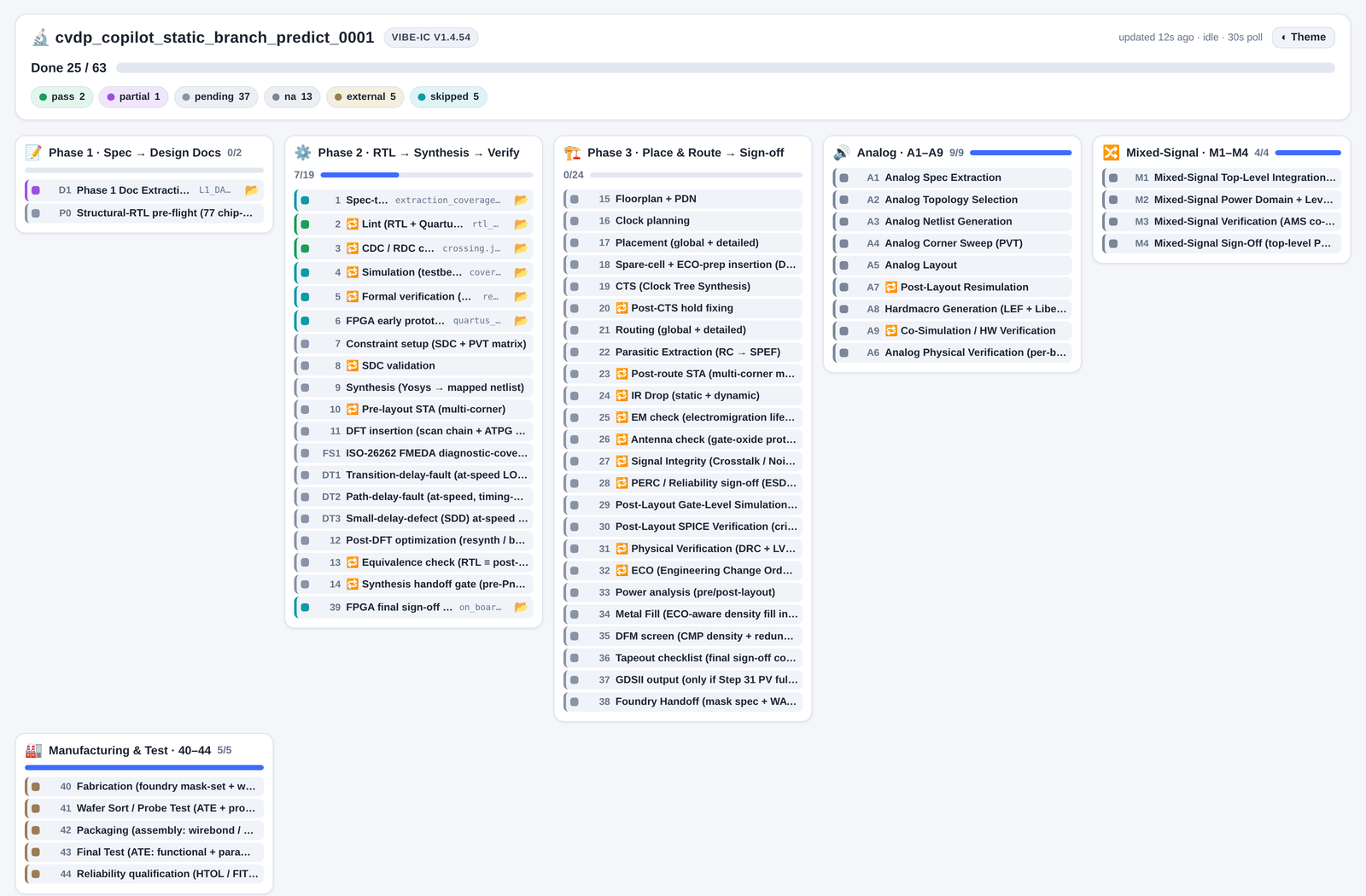
Design philosophy
Three ideas shape everything Vibe-IC does. They are why a PASS is trustworthy and why the flow generalizes across chips instead of memorizing them.
1 · Open platform
The plugin is Apache-2.0, and the entire backend is real open-source EDA — no commercial-tool dependency for the core flow. Where a stock tool fell short we did not stop; we FORKED it (vibeic/OpenROAD, yosys, magic, netgen, iverilog, klayout, ngspice) and enhanced it, shipped as one reproducible container. You can self-host the whole stack, read every line, and contribute back upstream. No vendor lock-in, no black boxes.
2 · Program-first + AI-backup
Deterministic programs do the work and hold every gate; the AI expert is the backup, not the primary author. Where a step is genuinely a language task (spec → RTL), the AI authors — but always inside the runner's pipeline, wrapped by deterministic gates (hygiene, conformance, lint, synth, audit). The two run as a dual track: the program and an independent AI read the same problem, and every disagreement is converged. A recovery the AI finds is not left in a prompt — it is absorbed back into the program layer, so the next blind run auto-recovers it. That is why the same result reproduces across machines and sessions.
3 · Blind & correct-by-construction
Every step reads only the design INPUT — the prompt plus any provided context — never a hidden testbench, golden answer, or scoring oracle. A number earned this way measures real capability, not overfitting to an answer key. And nothing is a silent PASS: every gate re-computes its verdict, every tool call is logged to provenance with hashes, and canonical artifacts are SHA256-attested — so a fabricated result cannot pass as a real one.
Forked open-source EDA tools
Which open-source tool stands in for each commercial one, how mature each substitution is, what we enhanced in our forks, and the benchmark numbers the whole stack produces.
Open-source vs commercial tools
Every commercial sign-off tool has an open-source counterpart that Vibe-IC already drives. For DRC on a foundry deck, STA, and LVS the substitution is strong; a few dimensions (crosstalk SI, foundry-rule extraction, ESD/latch-up) are honestly a conservative tier. The Rigor column is our own honest grade, not a vendor claim.
| Commercial | Function | Open-source (in vibeic-eda) | Rigor |
|---|---|---|---|
| Calibre nmDRC | DRC | KLayout SVRF interpreter (svrfdrc) — runs the foundry's own Calibre deck natively | Strong |
| Calibre nmLVS | LVS | netgen + KLayout NetlistComparer (device-level) | Strong |
| PrimeTime | Static timing | OpenSTA — multi-corner OCV, SDF | Strong |
| PrimeTime-SI | Crosstalk-delay | OpenSTA MCF-bound (conservative) | Conservative |
| StarRC / QRC | Parasitic extraction | OpenRCX + FasterCap 3D BEM field-solve | Conservative |
| Redhawk / Voltus | IR-drop / EM | OpenROAD PSM (static + dynamic) | Adequate |
| Calibre PERC | ESD / latch-up | magic geometry + manual review | Weak |
| TetraMAX | ATPG | AUCOHL Fault (stuck-at + path-delay) | Strong |
| VCS / Xcelium | RTL simulation | iverilog (forked, SV-2012) + Verilator | Strong |
| Design Compiler | Synthesis | yosys (forked) + OpenROAD | Strong |
One honest limit — the cross-run equivalence audit has no free replacement. Its purpose is not to do the function (open tools already do it) but to prove our result matches the specific commercial golden a foundry / customer signs off on. You cannot cross-check Calibre with a free Calibre-clone — the value is correlation to the trusted reference. So this stays an EXTERNAL gate (Calibre / PrimeTime cross-run + a silicon shuttle), a trust requirement, not a capability gap. Nothing here is silicon-proven.
Our enhancements — the vibeic-eda forks
When a stock open-source tool crashed, produced a wrong result, or could not run a construct the flow needs, we treated it as an engineering backlog item against our fork — never as a reason to reach for a commercial tool. Across the 15 forks surveyed against commercial EDA, every forkable gap is now resolved: it is either a real gated fix, already covered by the upstream tool (with the citation shown), or honestly classified as an external trust requirement. Each landed change is committed to the fork and baked into the reproducible image. The scoreboard is public and tracked live. Scope, stated plainly: that survey covered 15 forks, which is not the whole toolchain. Measured and CLOSED 2026-07-31: fault — the DFT/ATPG engine this flow invokes — was used but never forked, so no guard could check it, no registry listed it and the daily upstream merge could not see it; the inherited binary had aged four years. It is now built from vibeic/Fault and ships in image 0.2.51, carrying our fix for chain --skip-synth exiting EX_OK while never creating the file -o asked for. The four forks absent from the daily merge (Xyce, slang, sv-elab, xschem) are in it. trilinos/Trilinos — the last entry on the pending list, held open on the belief that a whole-history push would fail at that size — is mirrored too. check_fork_only now reads 49 of 49 references ours, 0 pending, for the first time.
Where the fixes landed
| Fork | Enhancement direction |
|---|---|
| OpenROAD + OpenSTA | Advanced-node DRC completeness (LEF58 MIN-STEP / MAX-EDGES), per-net-weight timing- and congestion-driven IO pin placement, and PDN strap- and decap-sizing inverses gated against an independent field solver. The src/sta timing engine is now the vibeic OpenSTA fork — signoff-SI and timing-ECO kernels (crosstalk delta-delay, CRPR, POCV/LVF paths). Plus the earlier post-route repair (slew / antenna diode loop) and DRT/RSZ/DPL severity reclass. |
| yosys | D-latch → liberty mapping, a gate-level ripple → $add lifter, tri-state fanin preservation, and a robust 0-cell stat row. |
| magic + netgen | DEF-based LVS crash / startup / infinite-loop trio fixed, NDR-via retention, and SPECIALNET power-name handling. netgen now guards black-box zero-pin cells and pulls device property / tolerance rules from the PDK — real device-level LVS on a foundry deck. |
| iverilog | SystemVerilog-2012 testbench coverage — nonblocking-event codegen, comp-unit package ordering, and forward-declared $dumpvars — so official VCS/Xcelium testbenches run under Icarus. |
| klayout | 16 native signoff operations in the SVRF engine — multi-patterning coloring, critical-area analysis, CMP density-gradient, native ERC / voltage-aware spacing, and an RVE result database — on top of the SVRF DRC interpreter (runs a foundry deck), device-level NetlistComparer LVS, and per-layer GDS merge / heal. |
| ngspice | Process-parallel AC frequency sweep (result-identical, ~5.5× at 8 jobs), a hardened flat-DSPF parasitic reader, and an OpenMP device-eval build — plus Monte-Carlo .mc dot-card and DC gshunt-homotopy convergence for analog / mixed-signal corner runs. |
| verilator | Multithreaded emitted simulation and parallel verilation (consumed as-is) — SystemVerilog testbench support alongside iverilog. |
| cocotb + cocotb-coverage | Parallel multi-DUT / multi-seed regression dispatch and a parallel coverage-database tree-reduce merge. |
| pyuvm + sby | pyuvm — RAL accessors, TLM comparators, and sequencer arbitration; sby — formal task and engine scheduling. |
New this cycle — parallel by default. The MCP EDA tools now use all host cores out of the box: OpenROAD / OpenSTA thread pools, KLayout tiled DRC threads, cocotb parallel builds, ngspice OpenMP, and verilator parallel verilation. It is a real speedup you get for free — cap it with one environment variable, VIBEIC_EDA_THREADS.
Benchmark results
The official benchmark scores in this table are clean-room blind results established by each benchmark's official scorer. Every benchmark row names the authoring model and the plugin version that produced it; single-shot and close-loop scores stay separate. Because the campaigns used different plugin versions, these are model + plugin datapoints, not a controlled model-only A/B. They measure functional generation through the canonical Vibe-IC entry and gate path — not silicon.
| Benchmark | Model · plugin | Clean single-shot | Terminal loop2converge | Notes |
|---|---|---|---|---|
| VerilogEval-v2 (156) | Claude Fable 5 · v1.4.81 | 153/156 = 98.08% | — | Single-shot, no close-loop. spec→RTL, official iverilog + _test.sv harness. |
| VerilogEval-v2 (156) | GPT-5.6-Sol · campaign-patched v1.13.78 | 151/156 = 96.79% | 153/156 = 98.08% | Shape C; Program solved 130 and AI backup/repair solved 26. Three official residuals remain in the denominator; this is campaign-patched evidence, not a shipped-release reproduction. |
| VerilogEval-Human (156) | Claude Fable 5 · v1.4.81 | 154/156 = 98.72% | — | Single-shot. Code-complete (ICCAD-2023), official iverilog harness. |
| VerilogEval-Human (156) | GPT-5.6-Sol · campaign-patched v1.13.78 | 152/156 = 97.44% | 153/156 = 98.08% | Shape C; Program solved 127 and AI backup/repair solved 29. Three official residuals remain in the denominator; this is campaign-patched evidence, not a shipped-release reproduction. |
| RTLLM v2.0 (50) | Claude Fable 5 · v1.3.88 | 47/50 = 94% | 49/50 = 98% | Runner-driven Shape B; one blind close-loop. Official testbench.v. |
| RTLLM v2.0 (50) | GPT-5.6-Sol · v1.14.5 | 48/50 = 96% | 48/50 = 96% | Runner-driven Shape B; two fresh zero-backlog rounds stayed 48/50 official (45/47 discriminating). Program First + AI review accepted 50/50 before scoring, but that semantic layer does not rewrite the official result. |
| NVIDIA CVDP (302, no-commercial) | Opus 4.8 · v1.2.63 | 243/302 = 80.46% | — | Official-compliant blind-author entry; prompt+context only, harness & golden off-limits. Scored on the official run_benchmark.py in the OSS cvdp-sim image. |
| spm — commercial-PDK sign-off | Not LLM pass@1 · v1.4.x | — | — | PASS_WITH_WAIVERS. A commercial 180nm NDA foundry PDK: DRC 4533 rules → 0, LVS device-level MATCH, STA 0 violated corners — every gate a real engine number. NOT silicon-proven; pending a commercial cross-run + silicon shuttle. |
The separate CVDP engineering checkpoint (2026-09-06) covers the original unfinished69 subset with one unresolved case. Official score: NOT_RUN; historical exposure makes it NOT_ELIGIBLE_AS_WHOLLY_BLIND. It is not a full-dataset score or Pass@1 and does not replace the official result above.
Tool substitution (disclosed)
Synopsys VCS / Cadence Xcelium → Icarus Verilog (forked, SV-2012) + Verilator · Design Compiler → Yosys + OpenROAD · PrimeTime → OpenSTA · Calibre → KLayout / Magic / Netgen · nvidia/cvdp-sim → the fully open CVDP image. Substitution is disclosed: these are official functional-testbench results under the published open runner, not claims of commercial-simulator or PPA equivalence.
What the number measures: each row measures what that exact model + plugin runner produced through the canonical blind entry, not what a raw LLM would do in isolation. The public benchmark-data cells retain the scorer output, trajectory, model identity, and hashes needed to reopen each claim. Full interpretation and links are on the Evaluation page.